Versions Compared

Key

  • This line was added.
  • This line was removed.
  • Formatting was changed.
Comment: Offline edits
What is

What are product data? Under this

collective

umbrella term, we understand both product-specific information such as master data and media, as well as offer data such as prices and

stocks (→ see data structure)

stock levels. Only with

the help of correct

accurate and comprehensive product data can we

enable

provide our customers

to shop inspiringly and efficiently by searching, navigating and filtering on our shop. Only through high-resolution photos

with an inspiring and efficient shopping experience through search, navigation, and filtering in our shop. On the product detail page, high-resolution images and videos, targeted product descriptions,

relevant

meaningful variants, and detailed specifications

on the product detail page, we are able

significantly increase

the

sales

opportunity

opportunities as well as customer satisfaction and

thus boost the

, consequently, customer loyalty.

Digitec Galaxus relies on

standardised

standardized formats for the automated and

mass

large-scale integration of product data. At the same time, we support partners in connecting to our system

flexibly and pragmatically by carrying out integration in stages (→ see Data preparation in stages)

in a flexible and pragmatic way by implementing a step-by-step integration process. As a partner, you benefit from

the

Digitec Galaxus’ existing

Digitec Galaxus

product

portfolio

database and can

add a comprehensive range of products by specifying just

activate overlapping assortments by providing only a few minimum requirements.

The data transfer is preferably carried out in

Data transmission preferably takes place via a direct connection

via

through an FTP server. Alternatively, product data can be

imported indirectly

integrated into our system indirectly via middleware or a third-party provider (

see Plugins & Middleware

plugins + middleware). Automated processes ensure the technical implementation of the step-by-step offer creation, product creation, and product enrichment (→ see

Technical

technical data processing). Accordingly, Digitec Galaxus relies on the

partner's

partner’s databases and does not provide a portal for product data preparation.


To enable a fast integration for our partners

to connect quickly

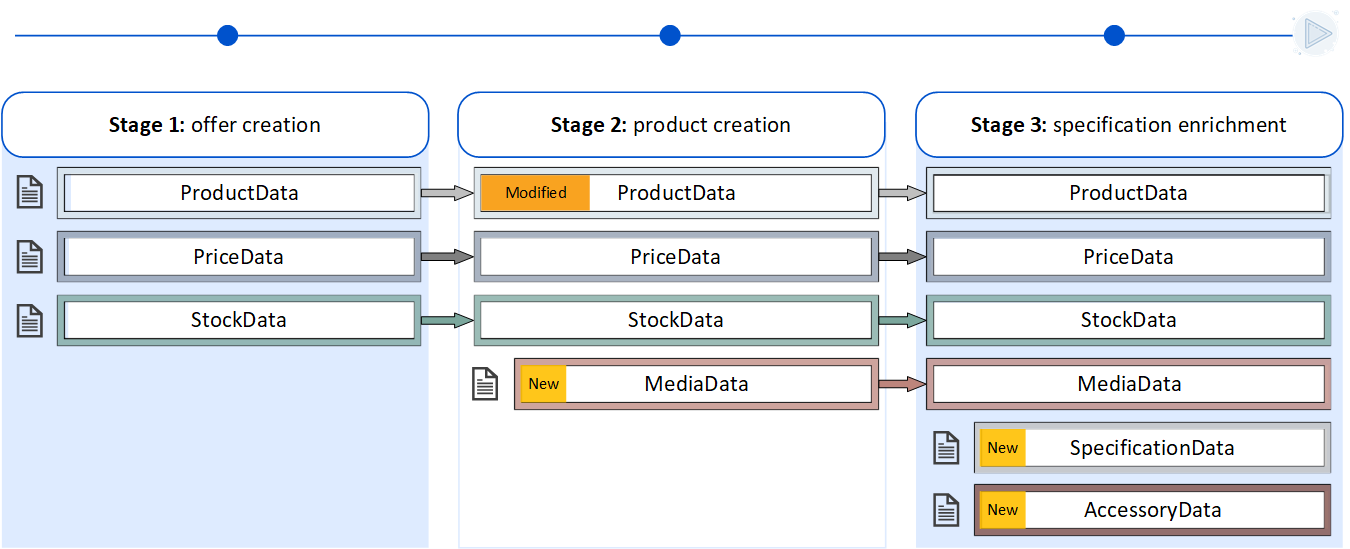
, we divide the data integration into

three

two stages. The requirements of the stages build on

each other, so that the initial integration is already possible if

one another, allowing the initial connection to be established by fulfilling only a few minimum criteria

are met

. This

data set

dataset can later be enriched and

supplemented later

expanded.

As following

Below, we explain the integration stages and provide an overview of the requirements and benefits of each stage.

With

stage

Stage 1,

the preparation and allocation of offers

offer creation and offer assignment, you can

get

achieve an efficient start to the

cooperation

partnership with

little

minimal effort. Here, you benefit from the existing product portfolio of our online shop by attaching your offer data to products that have already been created and maintained. Based on good availability and attractive

prices

pricing, you can generate

sales

revenue in no time.

With

stage

Stage 2, you activate

the

automated product creation and can independently integrate new assortments

independently

.

For you as

As a partner, this gives you the opportunity to appear as the

only supplier

sole provider in the shop.

By expanding your product range, you open up additional potential and benefit from the entire power of our platform.With stage 3

In addition, you enrich the already

opened

created products with purchase-relevant

features

attributes.

Our customers appreciate the

This allows our customers to benefit from an improved shopping experience, particularly through

the

enhanced filtering

option of

options in the search results.

Consequently, you increase conversion and sales of your products through better visibility and enlarged information content

By expanding your assortment and increasing the level of product information, you unlock additional potential and improve visibility, conversion, and revenue – supported by the full power of our platform.

Stage 1: Offer

creation and allocation

Assignment

By

specifying

fulfilling the minimum criteria listed below, data integration can take place with the

aim

objective of

creating

assigning offers

and allocating offers

to

products that have

already

been

maintained products.

Partners who

mainly

primarily supply new assortments should

tackle stages

approach Stage 1 and Stage 2

at the same time

simultaneously. Your responsible contact person at Digitec Galaxus will

analyse

analyze your

product range

assortment and provide you with

advice.

guidance

Stage 2:

Automated product creation

New Assortment

The

additional data required builds heavily

additionally required data is largely based on the structures of

stage

Stage 1.

Only

As minimum criteria, only the product title, product category

and

, product images, and attributes are added

as minimum criteria

.

With the

Upon completion of

stage

Stage 2, you activate

the

automated product creation and can independently enrich our assortment with new

articlesThe specifications are transmitted

items.

Stage 3: Specification enrichment

Specifications are submitted in a separate data sheet and can be used at any time to enrich existing products

at any time

.

Minimal criteria

Minimalkriterien

Item number (
  • ProviderKey

)
  • EAN/GTIN

  • Price

  • Stock

Minimal criteria

Minimum Criteria

  • Files from

stage
  • Stage 1

Products
  • Product title

  • Brand

  • Product category

product picture
  • Product images

product
  • Gross weight

Minimal criteria
  • Files from stage 1 and 2

    • Specifications (size, color, target group, …)

    Your

    advantage

    Benefits

    • Simple

    and
    • , compact data preparation

    • Your offers

    are added to
    • join our

    already
    • maintained products

    Based on
    • With good availability and attractive

    prices
    • pricing, you can generate

    sales
    • revenue with

    little initial
    • minimal effort

    Your

    advantage

    Benefits

    • You expand

    your range of products
    • the assortment available for purchase on Digitec Galaxus and thus

    exploit
    • unlock your full potential

    .
    As long as there are
    • If no offers from other partners exist, you appear as the sole

    supplier
    • provider

    • You benefit from the full power of our platform (performance marketing, retargeting,

    newsletter
    • newsletters, recommender systems, etc.)

    Your products can be automatically optimised by the inclusion of features from other partners
    • Your

    advantageYour
    • offers appear in the product selection and are not filtered out due to

    a lack of
    • missing specifications

    .
    • Your products are easier to find and

    thus receive
    • therefore gain increased visibility

    • You increase your sales (with each missing specification

    the
    • , conversion decreases by 12%)

    Data Preparation Stage 1

    Data Preparation Stage 2

    Data Preparation Stage 3


    For quick and efficient preparation of your files, we offer you ready-made template files for your integration model. Pay attention to the model and the data type. The templates are available for all variants with Minimal or Extended content.

    Expand
    titleExpand here to to find all sample files

    Stages

    Modell

    Data type

    Sample files

    Stage 1

    Retail

    csv

    xlsx

    Merchant

    csv

    xlsx

    Stage 2

    Retail/

    Merchant

    csv

    xlsx

    EU-Hub

    csv

    xlsx

    Stage 3

    All

    csv

    xlsx

    All

    stages

    Retail

    csv

    xlsx

    Merchant/

    EU-Hub

    csv

    xlsx

    For support in feed preparation, we provide our partner with the Feedchecker from Galaxus. The Feedchecker checks the individual created files for structural and content-related correctness. The output of the check is an Excel file with suggestions for improvement. In addition to the overview, it is also possible to see on a product basis which attributes still need to be adapted or supplemented. Details and corresponding instructions can be found in chapter 7.

    7 Feedchecker for Partners

    We recommend transmitting the price data and inventory data separately from the other

    FILE FORMAT

    We offer various file formats for data preparation. Please choose the standard that best suits your application and refer to the overview below for the requirements regarding the file structure. We recommend the CSV standard for automated data processing, while XLSX files are more suitable for manual adjustments within the files.

    Expand
    breakoutWidth1800
    titleKlicken Sie hier für die Anzeige der Dateiformate

    Insert excerpt
    File Format
    File Format
    nopaneltrue


    We recommend submitting price data and stock data separately from the remaining master data, as this allows different upload frequencies to be configured and

    makes

    reduces the risk of errors in data processing

    less error-prone

    . The

    partner's

    partner’s article number (

    provider key

    Provider Key) must be placed in the leading column of each data sheet to

    enable the allocation

    ensure proper assignment of the data sheets.

    Stage 1

    creates

    establishes the

    basis

    foundation for the

    other

    subsequent stages.

    Thus

    Therefore, the goal is that the files

    don’t have

    will not need to be

    adapted

    adjusted for the following stages.

    Image Removed

    Option 1

    Option 2

    image-20260216-091358.pngImage Added

    image-20260216-091408.pngImage Added

    Info

    Further information and details on the recommended data

    splits will be given in

    separation are provided within the individual stages.


    There are different ways to exchange data.

    Basically

    In principle, we prefer automated exports with

    constant

    consistent data quality. This

    enables

    allows us to present your products

    optimally

    in the best possible way and offer new

    products

    items to our customers as quickly as possible.

    Furthermore, the

    It also helps minimize processing effort and

    the

    sources of error

    can be minimised in this way

    .

    Galaxus

    distinguishes

    differentiates between direct and indirect data transmission. Direct data

    transfer

    transmission means that the data is

    loaded directly from the partner onto the FTP

    uploaded to the FTP server by the partner, either as an export or as manual

    file

    files. Indirect data

    transfer is when the data is transferred

    transmission refers to data being sent to Galaxus via middleware or a third-party provider.
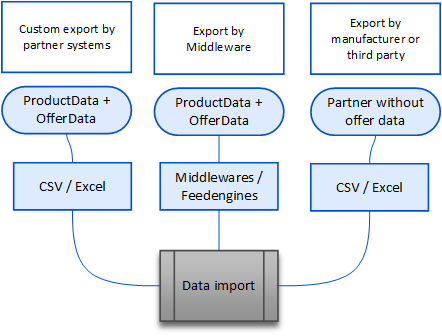
    Image Removed

    Diagramme_PDI_4.0_Datenübertragung_E.pngImage Added

    As an alternative to file

    export

    exports via FTP server, web service connections can also be implemented. As of today, API connections are not yet supported.

    Further information

    on

    regarding the web service

    connections

    connection, manual access to the exported data on the FTP, and manual product data

    processing

    management can be found in the following subsection:

    4 Data Transmission


    Automated processes enable us to efficiently process large quantities of product data. The basic principle is simple: the files supplied by the partner are imported and prepared for the integration processes. Subsequently, all brands, categories and specifications transmitted by the partner are compared with our existing data records in a semi-automated process and assigned if they match. After the assignment, the system automatically creates the finished products for our online shop and regularly updates the price and availability data.
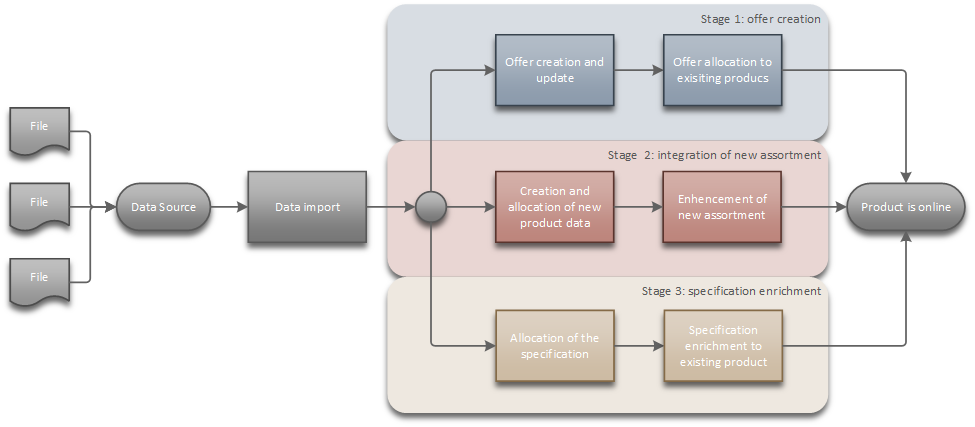
    Image RemovedDigitec Galaxus / Galaxus Deutschland works with static product data. This means that only price and availability data is updated with every change. Product information such as title, images, description and specifications are applied once and remain static thereafter. Adjustments must be communicated to the responsible person for you so that the data can be updated. Digitec Galaxus / Galaxus Deutschland independently revises and optimises products according to relevance in the shop

    Product and offer data are processed automatically and AI-assisted to assign products to existing items via the GTIN or to create new products. Processing is not possible without a GTIN.

    The final presentation and publication in the online shop depend on data quality, timeliness, complete mandatory information, and a correctly assigned product-type structure, which is also determined using AI.
    Only products that meet all quality, compliance, and offer requirements are approved, while images and attributes are automatically optimized and structured.

    image-20260216-101843.pngImage Added

    You can read more details in the following chapter EN 6 Data Processing.


    During

    operation

    operational processes, Digitec Galaxus continuously

    checks

    monitors the submitted data

    supplied

    . Technical errors are sent to the initially

    specified

    provided general contact person.

    Content-related and structural problems are communicated by automated e-mails from the sender address pdi@digitecgalaxus.ch.

    The e-mail contains either a text with a description of the error or a ZIP file in the attachment which contains the detailed error and a description of the solution. The communication is in English.

    All details can be found in subchapter 8 Troubleshooting of active datafeeds.

    Your import errors are visible in the Partner Portal. For further details, we recommend reading: Partner Portal (English)


    Image Added Seitenanfang


    Image Added to the overview